Failure and Completion Actions
Location: Sidebar → Automated Testing → Failure Action / Completion Action buttons
Failure and Completion Actions let you automate responses when test plan runs fail or finish. Configure them from the test plan header in the Automated Testing view. The purpose fo these actions are to help you automate doing handling scenarios when things go wrong, or you want to keep track of how things tracking. There are several examples provided here for Logging Results to a Database Table, Send Failure Alerts to Email, Database Table Clean-Up and Bucket Storage Clean-Up.
Failure Action
If a test fails during a test plan run, Supatester can respond automatically based on the Failure Action you configure. Click the Failure Action button in the test plan header to open the configuration dialog.
| Action | Behaviour |
|---|---|
| Continue Running | Ignore the failure and keep executing the remaining tests. This is the default. |
| Stop | Halt the run immediately — no further tests are executed. |
| Run item(s) from collection | Stop on failure and execute one or more saved requests from your Collections (under a chosen auth context). |
The Run item(s) from collection action is useful for recovery and cleanup. For example, you can point the failure action at an RPC or Edge Function that resets your database, so the database is always left in a known state for future runs — even when a test fails partway through. You can also use it for reporting purposes, to send emails or messages that tests have failed.
Completion Action
The Completion Action lets you automatically execute Collection Items after every Test Plan run — regardless of whether the run passed or failed. This enables post-run workflows such as logging results to a database table, sending email notifications, or posting alerts to Slack or Microsoft Teams.
Click the Completion Action button (next to the Failure Action button) in the test plan header to configure it.
| Setting | Description |
|---|---|
| Action | Choose None (do nothing) (default) or Run Collection Item. |
| Collection Item | A searchable dropdown listing all saved requests across your collections. Displayed as CollectionName / RequestName (type). |
| Auth Context | The authentication context to use when executing the collection item (e.g. Secret Key for service-role access). |
The {{$results}} Variable
When a Completion Action is configured, the special built-in variable {{$results}} is automatically populated with a JSON string containing the full run results — statistics, every test execution, and all failures with HTTP status codes and response data. Use {{$results}} in the request body of your Collection Item to send the results to an RPC function, Edge Function, or any Supabase endpoint.
For example, if you create an RPC function called log_test_run that accepts a results parameter of type JSONB, your Collection Item's params would be:
{
  "results": {{$results}}
}
The {{$results}} JSON includes:
run.stats— total/passed/failed/skipped test counts, total duration, and number of test plans.run.failures[]— an array of every failed test with the error message, HTTP status, and raw error response for debugging.run.executions[]— an array of every test execution in order, including pass/fail status, response data, extracted and resolved variables, and timing.startedAt/completedAt— ISO 8601 timestamps marking the run window.
Important: The Completion Action always runs — whether the Test Plan passed, partially failed, or fully failed. If you only want to act on failures, your target function can inspect
run.stats.tests.failed > 0and conditionally decide what to do.
Note:
{{$results}}is only available during the Completion Action phase. It cannot be referenced in regular test requests.
Completion Action in the CLI
The supatester-cli honours the completionAction setting from an export file. When a CLI run completes, the CLI builds the same {{$results}} JSON and executes the configured Collection Item (which must be present in the export file alongside the test plan). This means your post-run workflows work identically whether you run from the desktop app or from CI/CD.
Examples
Common Steps for Deploying Edge Functions for Actions:
Step 1 - Add Any Required Keys (If Required):
- Via the Portal, Select
Edge Functions>Secrets>Add or replace secrets(Name/Value)
Note: By default you get the
SUPABASE_URL,SUPABASE_ANON_KEY,SUPABASE_SERVICE_ROLE_KEY,SUPABASE_DB_URLSecret items in Secrets section.
Step 2: Create the Edge Function
- Via the Portal, select
Edge Functions>Deploy a new function>Via Editor
Step 3: Deploy the Edge Function
- Fill in the
index.tswith the desired Edge Function script. - Fill in the
Function Namewith the name you want to call the function (notify-test-failures). - Click
Deploy functionbutton.
Step 4: Create a Collection Item in Supatester
Collection configuration may vary slightly, in this example we are going to include the {{$results}} variable in the
- (Optional) Create a new Collection for storing your Edge Functions (e.g., "Failure/Completion Actions")
Edge Function Tester> Select from theEdge Functiondrop down list (notify-test-failures)- Add a new Edge Function request:
- Request Body (JSON):
{{$results}}
- Request Body (JSON):
- Click the Save to Collections button.
- Select the collection and name the request:
- Collection:
Failure/Completion Actions - Request Name:
invoke(notify-test-failures)
- Collection:
Example:
const { data, error } = await supabase.functions.invoke('notify-test-failures', {
  body: {{$results}},
})
Step 5: Configure the Completion Action
- Open the Test Plan (Automated Testing > Select Test Plan)
- Click Completion Action
- Set Action on completion to "Run item(s) from collection"
- Select Collection item(s) to run:
Failure/Completion Actions / invoke(notify-test-failures) - Set Auth to
Secret Key or Custom JWT(Edge Functions with "Verify JWT with legacy secret" enabled will need Custom JWT) - Click Save
Now whenever the Test Plan finishes, the Edge Function will be executed.
Example: Log Results to a Database Table
- Create a
test_runstable and an RPC function (e.g.log_test_run) that inserts results. - In Supatester, create a Collection Item calling
log_test_runwith{"results": {{$results}}}as the params. - Open your Test Plan → click Completion Action → set Action to Run Collection Item → select the item → set Auth Context to Secret Key → Save.
Every run now automatically logs to your database — from both the desktop app and the CLI.
Example - Log Results Data to a Supabase Table
This example offers you the ability to log every run of a Test Plan to a database Table. You could use this to build a status board of successful and failed runs.
Create TABLE:
CREATE TABLE test_runs (
  id UUID DEFAULT gen_random_uuid() PRIMARY KEY,
  source TEXT NOT NULL DEFAULT 'supatester',
  test_plan_name TEXT,
  total_tests INTEGER NOT NULL,
  passed INTEGER NOT NULL,
  failed INTEGER NOT NULL,
  skipped INTEGER NOT NULL,
  duration_ms NUMERIC NOT NULL,
  has_failures BOOLEAN NOT NULL DEFAULT false,
  failures JSONB DEFAULT '[]'::jsonb,
  executions JSONB DEFAULT '[]'::jsonb,
  full_results JSONB NOT NULL,
  started_at TIMESTAMPTZ NOT NULL,
  completed_at TIMESTAMPTZ NOT NULL,
  created_at TIMESTAMPTZ DEFAULT now()
);

-- Optional: create a view for quick failure debugging with response details
CREATE OR REPLACE VIEW test_failure_details AS
SELECT
  tr.id AS run_id,
  tr.test_plan_name,
  tr.started_at,
  f->>'testName' AS test_name,
  f->>'error' AS error,
  (f->>'httpStatus')::int AS http_status,
  f->>'httpStatusText' AS http_status_text,
  f->'response' AS response_data,
  f->>'rawErrorResponse' AS raw_error
FROM test_runs tr,
  jsonb_array_elements(tr.failures) AS f
WHERE tr.has_failures = true
ORDER BY tr.started_at DESC;

-- Enable RLS
ALTER TABLE test_runs ENABLE ROW LEVEL SECURITY;

-- Allow inserts via service role only
CREATE POLICY "Service role can insert test runs"
  ON test_runs FOR INSERT
  TO service_role
  WITH CHECK (true);

-- Allow reads via service role only
CREATE POLICY "Service role can read test runs"
  ON test_runs FOR SELECT
  TO service_role
  USING (true);
Create RPC FUNCTION
CREATE OR REPLACE FUNCTION public.log_test_run(results JSONB)
RETURNS jsonb
LANGUAGE plpgsql
SECURITY DEFINER
SET search_path = public
AS $$
DECLARE
  v_plan_name TEXT;
  v_role TEXT;
BEGIN
  -- Check the JWT role
  SELECT current_setting('request.jwt.claims', true)::json->>'role'
  INTO v_role;

  IF v_role IS DISTINCT FROM 'service_role' THEN
    RETURN jsonb_build_object(
      'success', false,
      'error', 'permission denied: service_role required'
    );
  END IF;

  -- Extract the first test plan name from executions (if available)
  v_plan_name := results->'run'->'executions'->0->>'testPlanName';

  INSERT INTO public.test_runs (
    test_plan_name,
    total_tests,
    passed,
    failed,
    skipped,
    duration_ms,
    has_failures,
    failures,
    executions,
    full_results,
    started_at,
    completed_at
  ) VALUES (
    v_plan_name,
    (results->'run'->'stats'->'tests'->>'total')::int,
    (results->'run'->'stats'->'tests'->>'passed')::int,
    (results->'run'->'stats'->'tests'->>'failed')::int,
    (results->'run'->'stats'->'tests'->>'skipped')::int,
    (results->'run'->'stats'->>'duration')::numeric,
    (results->'run'->'stats'->'tests'->>'failed')::int > 0,
    COALESCE(results->'run'->'failures', '[]'::jsonb),
    COALESCE(results->'run'->'executions', '[]'::jsonb),
    results,
    (results->>'startedAt')::timestamptz,
    (results->>'completedAt')::timestamptz
  );

  RETURN jsonb_build_object(
    'success', true,
    'message', 'test run logged successfully',
    'test_plan', v_plan_name
  );

EXCEPTION
  WHEN OTHERS THEN
    RETURN jsonb_build_object(
      'success', false,
      'error', SQLERRM
    );
END;
$$;

-- Remove access from everyone
REVOKE ALL ON FUNCTION public.log_test_run(JSONB) FROM PUBLIC;
REVOKE ALL ON FUNCTION public.log_test_run(JSONB) FROM anon;
REVOKE ALL ON FUNCTION public.log_test_run(JSONB) FROM authenticated;

-- Only allow service_role
GRANT EXECUTE ON FUNCTION public.log_test_run(JSONB) TO service_role;
Example: Send Failure Alerts to Email
- Create a Supabase Edge Function that inspects the results, and if there are failures, sends a notification (via a Slack webhook, Resend API, etc.).
- Create a Collection Item that calls this Edge Function with
{{$results}}as the body. - Configure the Completion Action to run that item.
Runs with no failures can be silently ignored by the Edge Function, while failures trigger an alert with the full error context.
Example - Send Failure Alerts to Email
Step 1: Set Up Resend
- Create an account at resend.com
- Obtain your Resend API key
- Add it as a Supabase secret:
RESEND_API_KEY=re_xxxxxxxxxx
NOTIFICATION_EMAIL=[email protected]
Step 2: Create the Edge Function
Create a new Edge Function (notify-test-failures/index.ts):
import { serve } from "https://deno.land/[email protected]/http/server.ts";
const RESEND_API_KEY = Deno.env.get("RESEND_API_KEY")!;
const NOTIFICATION_EMAIL = Deno.env.get("NOTIFICATION_EMAIL") || "[email protected]";
interface TestFailure {
testPlanName: string;
testName: string;
error: string;
criteriaUsed: string;
executionTime: number;
httpStatus?: number;
httpStatusText?: string;
response?: unknown;
rawErrorResponse?: string;
}
function escapeHtml(str: string): string {
return str.replace(/&/g, "&").replace(/</g, "<").replace(/>/g, ">");
}
function formatRawError(raw?: string): string {
if (!raw || raw === "null") return "—";
try {
const parsed = JSON.parse(raw);
return escapeHtml(JSON.stringify(parsed, null, 2));
} catch {
return escapeHtml(raw);
}
}
serve(async (req: Request) => {
try {
const results = await req.json();
const failures: TestFailure[] = results?.run?.failures ?? [];
// Only send email if there are failures
if (failures.length === 0) {
return new Response(
JSON.stringify({ message: "No failures, no email sent." }),
{ status: 200, headers: { "Content-Type": "application/json" } }
);
}
const stats = results.run.stats;
const planName =
results.run.executions?.[0]?.testPlanName ?? "Unknown Test Plan";
// Build email body with response details for debugging
const failureRows = failures
.map(
(f: TestFailure) =>
`<tr>
<td style="padding:8px;border:1px solid #ddd;">${escapeHtml(f.testPlanName)}</td>
<td style="padding:8px;border:1px solid #ddd;">${escapeHtml(f.testName)}</td>
<td style="padding:8px;border:1px solid #ddd;color:#e53e3e;">${escapeHtml(f.error)}</td>
<td style="padding:8px;border:1px solid #ddd;">${f.httpStatus ?? "—"} ${escapeHtml(f.httpStatusText ?? "")}</td>
<td style="padding:8px;border:1px solid #ddd;">${f.executionTime.toFixed(0)}ms</td>
<td style="padding:8px;border:1px solid #ddd;"><pre style="margin:0;font-size:11px;white-space:pre-wrap;">${formatRawError(f.rawErrorResponse)}</pre></td>
</tr>`
)
.join("");
const htmlBody = `
<div style="font-family:sans-serif;max-width:900px;">
<h2 style="color:#e53e3e;">⚠️ Supatester: ${stats.tests.failed} Test Failure(s)</h2>
<p><strong>Test Plan:</strong> ${escapeHtml(planName)}</p>
<p>
<strong>Summary:</strong>
${stats.tests.passed} passed,
${stats.tests.failed} failed,
${stats.tests.skipped} skipped
(${stats.duration.toFixed(0)}ms total)
</p>
<p><strong>Run completed:</strong> ${results.completedAt}</p>
<table style="border-collapse:collapse;width:100%;margin-top:16px;">
<thead>
<tr style="background:#f7f7f7;">
<th style="padding:8px;border:1px solid #ddd;text-align:left;">Plan</th>
<th style="padding:8px;border:1px solid #ddd;text-align:left;">Test</th>
<th style="padding:8px;border:1px solid #ddd;text-align:left;">Error</th>
<th style="padding:8px;border:1px solid #ddd;text-align:left;">HTTP Status</th>
<th style="padding:8px;border:1px solid #ddd;text-align:left;">Time</th>
<th style="padding:8px;border:1px solid #ddd;text-align:left;">Raw Error</th>
</tr>
</thead>
<tbody>${failureRows}</tbody>
</table>
</div>
`;
// Send email via Resend
const emailRes = await fetch("https://api.resend.com/emails", {
method: "POST",
headers: {
"Content-Type": "application/json",
Authorization: `Bearer ${RESEND_API_KEY}`,
},
body: JSON.stringify({
from: "Supatester <[email protected]>",
to: [NOTIFICATION_EMAIL],
subject: `❌ Supatester: ${stats.tests.failed} failure(s) in ${escapeHtml(planName)}`,
html: htmlBody,
}),
});
const emailData = await emailRes.json();
return new Response(JSON.stringify({ message: "Email sent", emailData }), {
status: 200,
headers: { "Content-Type": "application/json" },
});
} catch (error) {
return new Response(
JSON.stringify({ error: (error as Error).message }),
{ status: 500, headers: { "Content-Type": "application/json" } }
);
}
});
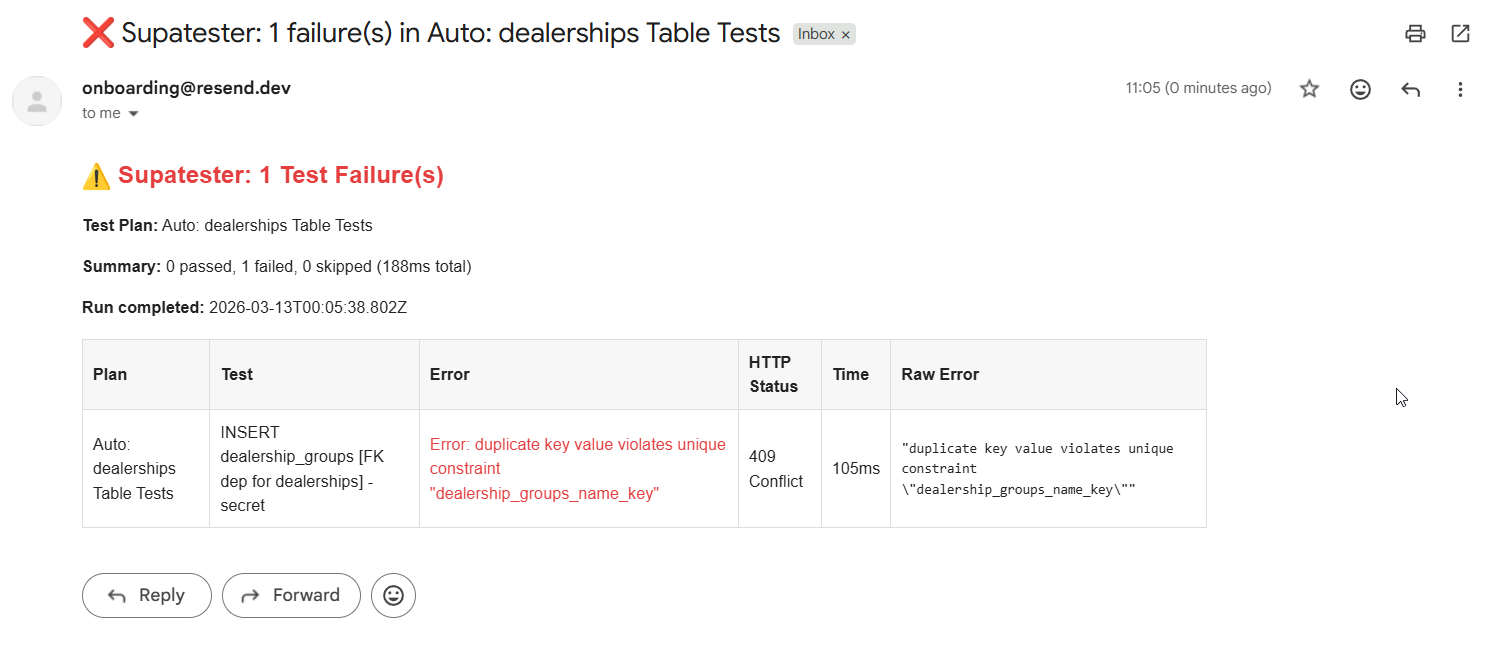
Whenever the Test Plan finishes and there are failures, you'll receive an email with a formatted table of all the errors. If all tests pass, the Edge Function returns early without sending an email.
Example - Database Table Clean-Up
How the Function Analyses Results
The function scans run.executions[] and builds a ledger of rows that were created vs. rows that were removed:
- INSERT operations — Detected by parsing the
requestCodefield for.insert(or byhttpStatus201. Theresponsearray contains the inserted rows with their primary keys. These are tracked as "created". - DELETE operations — Detected by parsing the
requestCodefield for.delete(). Theresponsearray contains the deleted rows. These are tracked as "removed". - Net calculation — Any row that was INSERTed but never DELETEd is considered orphaned and gets cleaned up.
The function identifies the table name by parsing the requestCode field for .from('tablename'). This is far more reliable than relying on test naming conventions, as the requestCode contains the actual resolved Supabase client code that was executed. If requestCode is not available (e.g., for skipped tests), the function falls back to parsing the test name.
Database Table Clean Up - Edge Function Code
Create a new Edge Function called supatester-cleanup-tables:
// supabase/functions/supatester-cleanup-tables/index.ts

import { createClient } from "npm:@supabase/supabase-js@2";

const corsHeaders = {
  "Access-Control-Allow-Origin": "*",
  "Access-Control-Allow-Headers":
    "authorization, x-client-info, apikey, content-type",
};

/**
 * Tracks which rows were inserted vs deleted per table,
 * then deletes any orphaned rows using their primary key.
 *
 * Uses the `requestCode` field to determine the table name and
 * operation type (insert/delete) from the actual Supabase client
 * code that was executed.
 */

interface Execution {
  testName: string;
  passed: boolean;
  skipped: boolean;
  httpStatus?: number;
  response?: unknown;
  requestCode?: string;
}

interface TrackedRow {
  table: string;
  primaryKey: string;
  primaryKeyValue: unknown;
}

/**
 * Extracts the table name from a requestCode string.
 * Looks for patterns like `.from('tablename')` or `.from("tablename")`.
 */
function extractTableFromCode(code: string): string | undefined {
  const match = code.match(/\.from\(['"]([^'"]+)['"]\)/);
  return match?.[1];
}

/**
 * Determines if the requestCode represents an INSERT operation.
 * Looks for `.insert(` in the code.
 */
function isInsertCode(code: string): boolean {
  return /\.insert\s*\(/.test(code);
}

/**
 * Determines if the requestCode represents a DELETE operation.
 * Looks for `.delete()` in the code.
 */
function isDeleteCode(code: string): boolean {
  return /\.delete\s*\(/.test(code);
}

/**
 * Fallback: extracts the table name from the test name.
 * Convention: "operation_tablename(...)" e.g. "insert_users(create)"
 */
function extractTableFromTestName(name: string): string | undefined {
  const match = name.match(/(?:insert|delete|remove)[_\s-]+(\w+)/);
  return match?.[1];
}

Deno.serve(async (req: Request) => {
  if (req.method === "OPTIONS") {
    return new Response("ok", { headers: corsHeaders });
  }

  try {
    const body = await req.json();

    // Accept either the full {{$results}} object or a nested { results: {{$results}} }
    const results = body.results ?? body;

    if (!results?.run?.executions) {
      return new Response(
        JSON.stringify({ error: "Invalid results: missing run.executions" }),
        {
          status: 400,
          headers: { ...corsHeaders, "Content-Type": "application/json" },
        }
      );
    }

    // ── Configuration ───────────────────────────────────────────────────
    // Accepts tablePrimaryKeys as:
    //   - A string (e.g. "id") → used as the default PK column for ALL tables
    //   - An object (e.g. { users: "id", orders: "uuid" }) → per-table PK columns
    // If omitted, defaults to "id" for all tables.
    const rawPKs = body.tablePrimaryKeys ?? "id";
    const TABLE_PRIMARY_KEYS: Record<string, string> =
      typeof rawPKs === "string" ? {} : rawPKs;
    const DEFAULT_PK: string | null =
      typeof rawPKs === "string" ? rawPKs : null;

    /** Look up the primary key column for a given table */
    const getPrimaryKey = (table: string): string | null =>
      TABLE_PRIMARY_KEYS[table] ?? DEFAULT_PK;

    // ── Build the ledger ────────────────────────────────────────────────
    const inserted: TrackedRow[] = [];
    const deleted: TrackedRow[] = [];

    for (const exec of results.run.executions as Execution[]) {
      if (exec.skipped) continue;

      const code = exec.requestCode ?? "";
      const name = exec.testName?.toLowerCase() ?? "";
      const rows = Array.isArray(exec.response) ? exec.response : [];

      // Determine operation type from requestCode (preferred) or fallback to test name / HTTP status
      const isInsert = code
        ? isInsertCode(code)
        : exec.httpStatus === 201 || name.includes("insert");
      const isDelete = code
        ? isDeleteCode(code)
        : name.includes("delete") || name.includes("remove");

      if (!isInsert && !isDelete) continue;

      // Determine the table name from requestCode (preferred) or fallback to test name
      const tableName = code
        ? extractTableFromCode(code) ?? extractTableFromTestName(name)
        : extractTableFromTestName(name);

      if (!tableName) continue;

      const pk = getPrimaryKey(tableName);
      if (!pk) continue; // Unknown table and no default PK, skip

      for (const row of rows) {
        if (row && typeof row === "object" && pk in row) {
          const tracked: TrackedRow = {
            table: tableName,
            primaryKey: pk,
            primaryKeyValue: row[pk],
          };
          if (isInsert) inserted.push(tracked);
          if (isDelete) deleted.push(tracked);
        }
      }
    }

    // ── Calculate orphans (inserted but never deleted) ──────────────────
    const deletedSet = new Set(
      deleted.map((d) => `${d.table}:${d.primaryKeyValue}`)
    );
    const orphans = inserted.filter(
      (row) => !deletedSet.has(`${row.table}:${row.primaryKeyValue}`)
    );

    if (orphans.length === 0) {
      return new Response(
        JSON.stringify({
          message: "No orphaned rows to clean up",
          inserted: inserted.length,
          deleted: deleted.length,
        }),
        {
          status: 200,
          headers: { ...corsHeaders, "Content-Type": "application/json" },
        }
      );
    }

    // ── Delete orphaned rows ────────────────────────────────────────────
    const supabaseUrl = Deno.env.get("SUPABASE_URL")!;
    const serviceRoleKey = Deno.env.get("SUPABASE_SERVICE_ROLE_KEY")!;
    const supabase = createClient(supabaseUrl, serviceRoleKey);

    // Group orphans by table for efficient batch deletes
    const orphansByTable = new Map<string, TrackedRow[]>();
    for (const row of orphans) {
      const existing = orphansByTable.get(row.table) ?? [];
      existing.push(row);
      orphansByTable.set(row.table, existing);
    }

    const cleanupResults: Array<{
      table: string;
      deletedCount: number;
      error?: string;
    }> = [];

    for (const [table, rows] of orphansByTable) {
      const pk = rows[0].primaryKey;
      const ids = rows.map((r) => r.primaryKeyValue);

      const { error, count } = await supabase
        .from(table)
        .delete({ count: "exact" })
        .in(pk, ids);

      cleanupResults.push({
        table,
        deletedCount: count ?? ids.length,
        ...(error ? { error: error.message } : {}),
      });
    }

    return new Response(
      JSON.stringify({
        message: "Clean-up complete",
        orphansFound: orphans.length,
        results: cleanupResults,
      }),
      {
        status: 200,
        headers: { ...corsHeaders, "Content-Type": "application/json" },
      }
    );
  } catch (err) {
    return new Response(
      JSON.stringify({ error: String(err) }),
      {
        status: 500,
        headers: { ...corsHeaders, "Content-Type": "application/json" },
      }
    );
  }
});
Example - Bucket Storage Clean-Up
How the Function Tracks File Lifecycle
Storage operations are more complex than table operations because files can be uploaded, copied, moved, and renamed. The function tracks the full lifecycle:
| Operation | Effect |
|---|---|
| upload | Adds the file path to the "exists" set |
| replaceFile | File already exists; no net change |
| copy | Adds the destination path (toPath) to the "exists" set |
| move | Removes the source path (fromPath), adds the destination path (toPath) |
| createFolder | Adds the folder path to the "exists" set |
| delete / remove | Removes the path(s) from the "exists" set |
At the end, anything remaining in the "exists" set was created but never removed — these are the orphaned files and folders that need cleaning up.
The function detects storage operations and extracts bucket names and file paths by parsing the requestCode field. For example, .from('avatars').upload('profile.png', file) tells the function the bucket is avatars and the path is profile.png. This is far more reliable than relying on test naming conventions. If requestCode is not available, the function falls back to the resolvedVariables field and test name parsing.
Bucket Storage Clean Up - Edge Function Code
Create a new Edge Function called supatester-cleanup-storage:
// supabase/functions/supatester-cleanup-storage/index.ts

import { createClient } from "npm:@supabase/supabase-js@2";

const corsHeaders = {
  "Access-Control-Allow-Origin": "*",
  "Access-Control-Allow-Headers":
    "authorization, x-client-info, apikey, content-type",
};

interface Execution {
  testName: string;
  passed: boolean;
  skipped: boolean;
  httpStatus?: number;
  response?: unknown;
  resolvedVariables?: Record<string, string>;
  extractedVariables?: Record<string, string>;
  requestCode?: string;
}

interface TrackedFile {
  bucket: string;
  path: string;
}

/**
 * Extracts the bucket name from a requestCode string.
 * Looks for patterns like `.from('bucketname')` in storage code.
 */
function extractBucketFromCode(code: string): string | undefined {
  const match = code.match(/\.from\(['"]([^'"]+)['"]\)/);
  return match?.[1];
}

/**
 * Extracts a file path from a requestCode string.
 * Handles patterns like .upload('path', ...), .download('path'), .copy('from', 'to'), etc.
 */
function extractPathsFromCode(code: string): { path?: string; fromPath?: string; toPath?: string; paths?: string[] } {
  const result: { path?: string; fromPath?: string; toPath?: string; paths?: string[] } = {};

  // .upload('path', ...) or .download('path') or .exists('path') or .info('path')
  const singlePathMatch = code.match(/\.(?:upload|download|exists|info|createSignedUrl|createSignedUploadUrl)\s*\(\s*['"]([^'"]+)['"]/);
  if (singlePathMatch) {
    result.path = singlePathMatch[1];
  }

  // .move('fromPath', 'toPath') or .copy('fromPath', 'toPath')
  const twoPathMatch = code.match(/\.(?:move|copy)\s*\(\s*['"]([^'"]+)['"]\s*,\s*['"]([^'"]+)['"]/);
  if (twoPathMatch) {
    result.fromPath = twoPathMatch[1];
    result.toPath = twoPathMatch[2];
  }

  // .remove([...]) — extract array of paths
  const removeMatch = code.match(/\.remove\s*\(\s*\[([^\]]*)\]/);
  if (removeMatch) {
    const inner = removeMatch[1];
    result.paths = [...inner.matchAll(/['"]([^'"]+)['"]/g)].map(m => m[1]);
  }

  // .list('path') — folder listing, not a file creation
  // .uploadToSignedUrl('path', 'token', file)
  const signedUploadMatch = code.match(/\.uploadToSignedUrl\s*\(\s*['"]([^'"]+)['"]/);
  if (signedUploadMatch) {
    result.path = signedUploadMatch[1];
  }

  return result;
}

/**
 * Determines the storage operation type from requestCode.
 */
function getStorageOpFromCode(code: string): string | undefined {
  if (/\.upload\s*\(/.test(code) && !/\.uploadToSignedUrl/.test(code) && !/\.createSignedUploadUrl/.test(code)) return "upload";
  if (/\.uploadToSignedUrl\s*\(/.test(code)) return "upload";
  if (/\.update\s*\(/.test(code) && /\.storage/.test(code)) return "replace";
  if (/\.copy\s*\(/.test(code)) return "copy";
  if (/\.move\s*\(/.test(code)) return "move";
  if (/\.remove\s*\(/.test(code)) return "delete";
  // createFolder is .upload('path/.gitkeep', ...)
  if (/\.upload\s*\(.*\/\.gitkeep/.test(code)) return "createFolder";
  return undefined;
}

/**
 * Fallback: attempts to extract a bucket name from the test name.
 * Convention: "operation_bucketname(description)"
 */
function extractBucketFromTestName(name: string): string | undefined {
  const match = name.match(
    /(?:upload|download|copy|move|rename|delete|remove|createfolder|create_folder)[_\s-]?(\w+)/
  );
  return match?.[1] || undefined;
}

Deno.serve(async (req: Request) => {
  if (req.method === "OPTIONS") {
    return new Response("ok", { headers: corsHeaders });
  }

  try {
    const body = await req.json();

    // Accept either the full {{$results}} object or a nested { results: {{$results}} }
    const results = body.results ?? body;

    if (!results?.run?.executions) {
      return new Response(
        JSON.stringify({ error: "Invalid results: missing run.executions" }),
        {
          status: 400,
          headers: { ...corsHeaders, "Content-Type": "application/json" },
        }
      );
    }

    // ── Track file lifecycle ────────────────────────────────────────────
    // Key: "bucket:path" → tracks files that currently exist due to test actions
    const existingFiles = new Map<string, TrackedFile>();

    // Helper to create a consistent key
    const fileKey = (bucket: string, path: string) => `${bucket}:${path}`;

    for (const exec of results.run.executions as Execution[]) {
      if (exec.skipped) continue;

      const code = exec.requestCode ?? "";
      const name = exec.testName?.toLowerCase() ?? "";
      const vars = {
        ...exec.resolvedVariables,
        ...exec.extractedVariables,
      };

      // Determine bucket from requestCode (preferred) or fallback to variables / test name
      const bucket = code
        ? extractBucketFromCode(code) ?? vars?.bucket ?? vars?.bucketName ?? extractBucketFromTestName(name)
        : vars?.bucket ?? vars?.bucketName ?? extractBucketFromTestName(name);

      if (!bucket) continue;

      // Determine operation and paths from requestCode (preferred) or fallback to test name + variables
      const op = code ? getStorageOpFromCode(code) : undefined;
      const codePaths = code ? extractPathsFromCode(code) : {};

      // ── Upload: adds a file ───────────────────────────────────────
      if (op === "upload" || op === "createFolder" || (!op && (name.includes("upload") && !name.includes("signed")) || (!op && (name.includes("createfolder") || name.includes("create_folder"))))) {
        const path = codePaths.path ?? vars?.path ?? vars?.folderPath ?? "";
        if (path && !exec.skipped) {
          existingFiles.set(fileKey(bucket, path), { bucket, path });
        }
      }

      // ── Copy: adds the destination file ───────────────────────────
      if (op === "copy" || (!op && name.includes("copy"))) {
        const toPath = codePaths.toPath ?? vars?.toPath ?? vars?.to ?? "";
        if (toPath) {
          existingFiles.set(fileKey(bucket, toPath), { bucket, path: toPath });
        }
      }

      // ── Move / Rename: removes source, adds destination ───────────
      if (op === "move" || (!op && (name.includes("move") || name.includes("rename")))) {
        const fromPath = codePaths.fromPath ?? vars?.fromPath ?? vars?.from ?? "";
        const toPath = codePaths.toPath ?? vars?.toPath ?? vars?.to ?? "";
        if (fromPath) {
          existingFiles.delete(fileKey(bucket, fromPath));
        }
        if (toPath) {
          existingFiles.set(fileKey(bucket, toPath), { bucket, path: toPath });
        }
      }

      // ── Replace: file already exists, no net change ───────────────
      // (op === "replace" — no action needed)

      // ── Delete / Remove: removes files ────────────────────────────
      if (op === "delete" || (!op && (name.includes("delete") || name.includes("remove")))) {
        // Paths from requestCode (.remove([...]))
        if (codePaths.paths && codePaths.paths.length > 0) {
          for (const p of codePaths.paths) {
            existingFiles.delete(fileKey(bucket, p));
          }
        }
        // Single file path from requestCode or variables
        const singlePath = codePaths.path ?? vars?.path ?? "";
        if (singlePath) {
          existingFiles.delete(fileKey(bucket, singlePath));
        }
        // Multiple files from variables (comma/newline separated)
        const paths = vars?.paths ?? "";
        if (paths) {
          for (const p of paths.split(/[,\n]/).map((s) => s.trim()).filter(Boolean)) {
            existingFiles.delete(fileKey(bucket, p));
          }
        }
      }
    }

    // ── Clean up orphaned files ─────────────────────────────────────────
    const orphans = Array.from(existingFiles.values());

    if (orphans.length === 0) {
      return new Response(
        JSON.stringify({ message: "No orphaned files to clean up" }),
        {
          status: 200,
          headers: { ...corsHeaders, "Content-Type": "application/json" },
        }
      );
    }

    const supabaseUrl = Deno.env.get("SUPABASE_URL")!;
    const serviceRoleKey = Deno.env.get("SUPABASE_SERVICE_ROLE_KEY")!;
    const supabase = createClient(supabaseUrl, serviceRoleKey);

    // Group orphans by bucket for batch removal
    const orphansByBucket = new Map<string, string[]>();
    for (const file of orphans) {
      const existing = orphansByBucket.get(file.bucket) ?? [];
      existing.push(file.path);
      orphansByBucket.set(file.bucket, existing);
    }

    const cleanupResults: Array<{
      bucket: string;
      paths: string[];
      error?: string;
    }> = [];

    for (const [bucket, paths] of orphansByBucket) {
      const { error } = await supabase.storage
        .from(bucket)
        .remove(paths);

      cleanupResults.push({
        bucket,
        paths,
        ...(error ? { error: error.message } : {}),
      });
    }

    return new Response(
      JSON.stringify({
        message: "Storage clean-up complete",
        orphansFound: orphans.length,
        results: cleanupResults,
      }),
      {
        status: 200,
        headers: { ...corsHeaders, "Content-Type": "application/json" },
      }
    );
  } catch (err) {
    return new Response(
      JSON.stringify({ error: String(err) }),
      {
        status: 500,
        headers: { ...corsHeaders, "Content-Type": "application/json" },
      }
    );
  }
});